Part 1: Basic Fish
Memory, Personality, and Taking It Portable
Part 1: Basic Fish
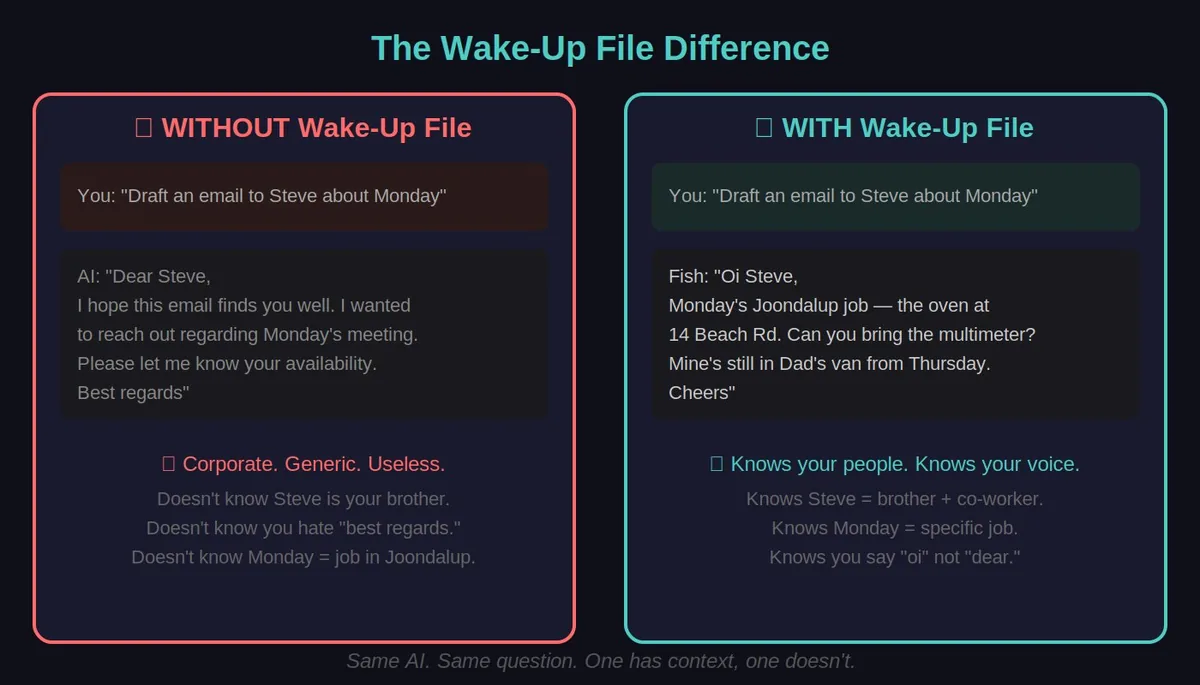
The goldfish problem has a simple fix: you write down who you are and paste it in every time. Sounds dumb. Works brilliantly. This is where Fish stopped being a stranger and started being a mate.
What You’re Building
A setup where AI starts every conversation knowing who you are, what you’re working on, and how you like things done.
No more explaining yourself every time.
📖 Chapter 1: Pick Your Platform
📱 Mobile note: It is much easier to set this up on a computer first. The mobile apps are great for USING Fish, but annoying for BUILDING Fish. Do the setup on a laptop, then enjoy the results on your phone.
Pick ONE (whichever you already use):
Option A: Claude (Recommended)
Go to claude.ai
Sign up or log in
Find “Projects” in the sidebar (might need to hunt for it)
Click “Create Project”
✅ Checkpoint: You see a project with a place to add instructions
Option B: ChatGPT
Go to chatgpt.com
Log in (need Plus subscription - $20/month for this feature)
Find “Explore GPTs” or “My GPTs”
Click “Create a GPT”
✅ Checkpoint: You see a GPT builder screen
Option C: Google Gemini
Go to gemini.google.com
Log in
Find “Gems” in the sidebar
Click “New Gem”
✅ Checkpoint: You see a Gem creation screen
Stuck? Ask your AI: “How do I create a [Project/Custom GPT/Gem] in [Claude/ChatGPT/Gemini]? Walk me through it step by step.”
Note: These UIs change constantly. If the menu item isn’t where I said, search around or ask your AI for current instructions.
📖 Chapter 2: Write Your Wake-Up File
This is the magic bit. A file that tells AI who you are, every time it wakes up.
The Template
Copy this and fill in YOUR details: ` ## WHO I AM
Name: [Your name] Location: [City, timezone] Job/Role: [What you do]
WHAT I’M WORKING ON
Current projects: - [Project 1]: [One line description] - [Project 2]: [One line description]
HOW I LIKE THINGS
Communication style: - [e.g., “Direct and blunt, skip the corporate speak”] - [e.g., “Short paragraphs, not walls of text”] - [e.g., “Don’t ask 10 questions before helping - have a crack”]
Things I hate: - [e.g., “Sycophantic praise”] - [e.g., “Excessive warnings and disclaimers”] - [e.g., “Being asked if I’m sure about things”]
CONTEXT YOU SHOULD KNOW
[Stuff that comes up constantly that you’re sick of re-explaining]
- [e.g., “I run three trade businesses in Perth”]
- [e.g., “I’m writing a novel about time travel”]
- [e.g., “I have ADHD so get to the point fast”]
#### Real Example (Sarah the Designer)## WHO I AM
Name: Sarah Location: Melbourne, Australia (AEST) Job/Role: Freelance graphic designer, studying psychology part-time
WHAT I’M WORKING ON
Current projects: - Rebrand for a local cafe (due end of month) - Psychology essay on cognitive biases (due in 2 weeks) - Building my portfolio website
HOW I LIKE THINGS
Communication style: - Casual and friendly, like talking to a colleague - Show me examples, not just explanations - If I ask for feedback, be honest - don’t sugarcoat
Things I hate: - “As a graphic designer, you probably know…” (just tell me) - Super long responses when I asked a simple question - Being asked “what’s your budget” for every recommendation
CONTEXT YOU SHOULD KNOW
- I use Figma for design, not Adobe
- My cafe client is very traditional - no trendy minimalist stuff
- I’m a visual learner - diagrams help
- I work weird hours (night owl) ` #### Put It In Your Platform
Claude Projects: Project Instructions → paste → save
ChatGPT Custom GPT: Instructions field → paste → save
Gemini Gems: Instructions → paste → save
✅ Checkpoint: Ask your AI “What do you know about me?” - it should nail the basics.
📖 Chapter 3: Teach It Your Stuff
Now upload the context it needs to actually help you.
What To Upload
For business: Price lists, service descriptions, FAQs, common processes
For creative work: Character sheets, plot outlines, style guides, world-building docs
For technical work: Documentation, architecture notes, coding standards
For personal: Research notes, reference material, things you look up constantly
The Golden Rule
Don’t just dump files. Tell it how to use them.
❌ Bad: [uploads price_list.pdf]
✅ Good: “This is my current price list. Use it for quotes. These prices are current as of [date]. If something isn’t in here, DON’T MAKE IT UP - tell me you don’t have that info.”
The Fourth Wall Technique
When AI is confused, ask it directly:
- “What about my instructions is unclear?”
- “If you were going to mess this up, how would you mess it up?”
- “What information are you missing?” This single technique saved me months of debugging. Instead of guessing why AI did something dumb, just ask it.
✅ Checkpoint: Ask about something specific from your uploaded docs. It should use YOUR info, not generic internet knowledge.
📖 Chapter 4: Give It A Job
Your Fish needs a purpose beyond just “be helpful.”
Job Description Template
Add this to your instructions: ` ## YOUR JOB
Your primary role is to help me with [MAIN THING].
When I come to you, assume I want help with: 1. [Most common task] 2. [Second most common task] 3. [Third most common task]
Unless I say otherwise, prioritize [THING] over [OTHER THING].
#### Example (Tradie Version) ## YOUR JOB
Your primary role is to help me run my trade business efficiently.
When I come to you, assume I want help with: 1. Drafting customer communications (quotes, follow-ups, scheduling) 2. Solving technical problems (appliance issues, job logistics) 3. Business admin (invoicing, scheduling, documentation)
Unless I say otherwise, prioritize speed over perfection. I need “good enough now” not “perfect later.” ` ✅ Checkpoint: Ask for help with your main task WITHOUT explaining context. It should just… help. Like a colleague who knows what you do.
📖 Chapter 5: Set The Rules
This is where you prevent the annoying behaviors.
Thinking Rules Template
` ## HOW TO THINK
When I ask you something: 1. Do the thing first 2. Explain what you did second 3. Offer alternatives third
Don’t: - Ask me 5 clarifying questions before starting - Give me warnings I didn’t ask for - Hedge everything with “it depends”
If you’re uncertain: - Make your best guess - Tell me your confidence level - Let me correct you if needed
If you don’t know something: - Say “I don’t know” rather than making things up - Tell me what info you’d need ` #### Add Your Pet Peeves
Whatever annoys you about AI, write a rule for it:
- “Don’t start responses with ‘Great question!’”
- “Don’t repeat my question back to me”
- “Don’t give me safety warnings unless I’m about to do something actually dangerous”
- “If I say ‘go’ or ‘do it’, that means green light - stop asking for confirmation” ✅ Checkpoint: Test a pet peeve. Does it still do the annoying thing? Adjust the rule until it doesn’t.
🎉 CONGRATULATIONS!
YOU HAVE A BASIC FISH
Built your first Fish? Legend. 🥧 Buy me a pie if it helped.
What you’ve got:
- AI that knows who you are
- AI that knows your stuff
- AI that works the way you want This is already more useful than most people’s AI setup.
Cost: Free
Time: 30 minutes
Result: AI that actually remembers you (within this platform)
Your First Week With Fish
Cool, you built it. Now what do you actually DO with it?
Monday: Ask Fish to draft an email you’ve been putting off. See how much context it already has.
Tuesday: When Fish gets something wrong, use the Fourth Wall: “You just said X, but it should be Y. What should I add to your instructions so you don’t make that mistake again?”
Wednesday: Upload one more document you reference often - a price list, a template, your favourite curse words.
Thursday: Add a rule for something that annoyed you. “Always quote in AUD” or “Never suggest I wake up early.”
Friday: Ask Fish: “Based on our conversations this week, what else should I add to your wake-up file?”
That’s the loop. Correct, improve, repeat. Your Fish gets smarter every week because YOU’RE training it.
This is why Fish beats generic AI. It’s not just memory - it’s compounding improvement.
Should You Keep Going?
STOP HERE if:
- You only use one AI platform
- This already does what you need
- You don’t want to mess with servers Basic Fish is enough for most people. Seriously. Don’t overcomplicate it.
CONTINUE if:
- You want the same Fish across Claude AND ChatGPT AND Gemini
- You want AI that can write memories, not just read them
- You’re curious and like tinkering
📖 Chapter 6: Taking Fish Portable (Across Platforms)
Once Fish remembered me, the next problem was obvious: I didn’t want to be locked to one platform. What if Claude was down? What if ChatGPT had a better feature? Fish needed to travel.
A way to keep your Fish brain in sync across multiple platforms.
Why bother? Maybe you use Claude for reasoning, ChatGPT for certain features, and Gemini for the big context window. Portable Fish means they all know the same stuff.
The Export Trick
The simplest version - manual but it works.
Your Portable Brain
Create a single document (Google Doc, Notion, whatever) containing:
Your wake-up file
Key context documents
Current priorities/projects
The Ritual
Starting a new conversation:
Open your portable brain doc
Copy the relevant sections
Paste into new chat
Continue as normal
Ending a conversation:
Ask: “Summarize what we did, what we decided, and what’s next”
Copy the summary
Add to your portable brain doc under “Recent Sessions”
Yeah, it’s manual. But it works everywhere - Claude, ChatGPT, Gemini, local models, whatever.
Platform Memory
Most platforms now have “memory” features:
Claude: Memories (Settings → enable)
ChatGPT: Memory (Settings → Personalization → Memory)
Gemini: Still limited
⚠️ Warning about platform memory:
You don’t fully control what it stores
It might share data in ways you don’t expect
Don’t store: passwords, API keys, customer PII, financial details DO NOT STORE in platform memory:
Passwords or credentials
API keys or tokens
Customer personal information
Financial account details
Anything you wouldn’t want leaked When in doubt, keep it in YOUR document, not their memory.
✅ Checkpoint: Start a fresh conversation, paste your portable brain, ask “what do you know about my current projects?” - should nail it.
🛑 DECISION POINT
DO YOU NEED PART 3?
Before You Continue, Read This
Part 2 (Power Fish) involves:
- Renting a server (~$6/month)
- SSH (command line access to a remote computer)
- Copy-pasting code you might not understand
- Basic server maintenance If any of this sounds scary, STOP HERE.
The Portable Fish approach above does 80% of what Power Fish does with 10% of the complexity.
Only continue if:
- ✅ You’re comfortable following 20+ copy/paste commands
- ✅ You’re okay troubleshooting when something doesn’t work
- ✅ You actually NEED AI that writes to its own memory
- ✅ You enjoy tinkering with tech Part 2 is optional. You’re not missing out on the main value by skipping it.
If you’re still keen, let’s go. But don’t say I didn’t warn you.
Stopping at Part 2? Smart choice. 🥧 Pie me if it helped.