Part 2: Power Fish
Your Own Server, Your Own Brain
Part 2: Power Fish
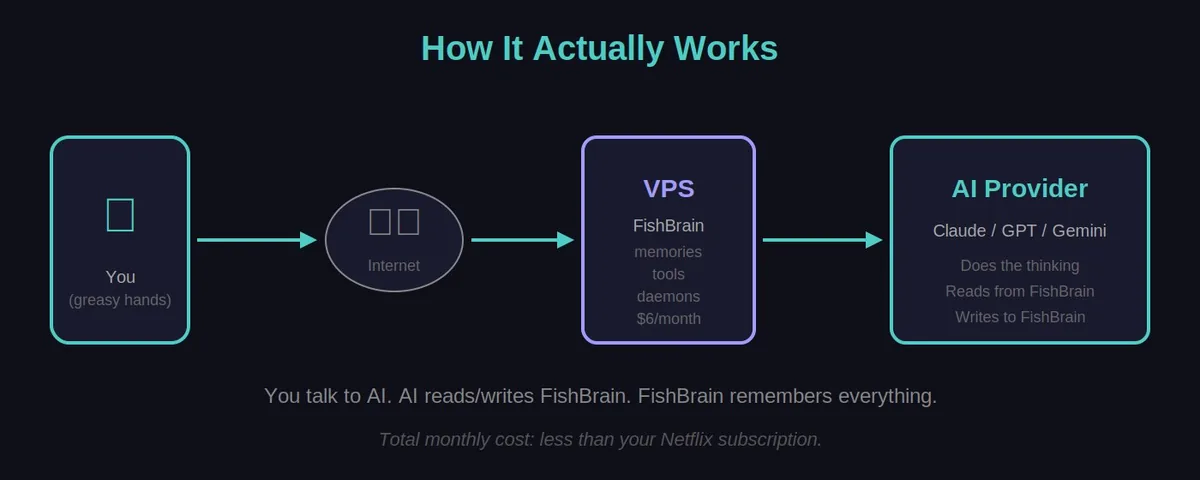
Copy-paste worked. But I wanted Fish to write its OWN memories, not wait for me to update a Google Doc. That meant giving it a brain – a real server with a real database. This is where it stopped being a document and started being a system.
⚠️ ️ SECURITY WARNING - READ THIS
If you do Part 2, you are now a sysadmin.
The setup in this guide is the “Cowboy Way” - minimum viable complexity to get a result. It is NOT enterprise-grade security.
Minimum safety checklist:
HTTPS/SSL encryption (your data travels unencrypted)
Non-root user setup (we run as root which is lazy)
Firewall configuration (server is exposed)
Rate limiting (someone could hammer your API) For a $6 server holding your notes? The cowboy way is probably fine.
For anything with real data? Talk to an actual sysadmin or use a proper service.
⚡ 10-Minute Safer (Optional But Recommended)
Want to be a responsible cowboy? Run these after your server is working: ` ## 1. Install firewall and only allow SSH + web traffic apt install ufw -y ufw allow 22 # SSH ufw allow 80 # HTTP ufw allow 443 # HTTPS (for later) ufw enable
2. Install fail2ban (blocks IPs that try wrong passwords)
apt install fail2ban -y systemctl enable fail2ban systemctl start fail2ban
3. Create a non-root user (optional but good practice)
adduser fishkeeper usermod -aG sudo fishkeeper ` That’s it. You’re now safer than 90% of hobbyist servers. Full HTTPS with Let’s Encrypt is a bigger job - search “certbot nginx” if you want it.
📖 Chapter 7: Your Own Server
You’re getting a computer on the internet that stores your Fish’s memories.
👉 Step 1: Get a Server
Go to digitalocean.com (or Vultr, Linode, whatever)
Create account (needs credit card)
Create a “Droplet” (their word for server)
Choose:
Ubuntu 24.04 (the operating system)
Basic plan, $6/month (the cheapest)
Region: Somewhere close to you
Authentication: Password (simpler for beginners)
Create it
✅ Checkpoint: You have an IP address (like 143.198.xxx.xxx)
👉 Step 2: Connect To It
On Mac/Linux: ssh root@YOUR_IP_ADDRESS On Windows:
- Download PuTTY, or
- Use Windows Terminal with:
ssh root@YOUR_IP_ADDRESSIt’ll ask for your password. Type it (you won’t see characters - that’s normal).
✅ Checkpoint: You see a command prompt like
root@ubuntu:~#
Stuck? Ask your AI: “I’m trying to SSH into a DigitalOcean droplet from [Mac/Windows]. Walk me through it step by step.”
📖 Chapter 8: Install FishBrain
Now you’re putting your Fish’s memory on this server.
👉 Step 1: Install the basics
Copy-paste each line, hit enter, wait for it to finish:
apt update apt install -y python3 python3-pip nginx pip3 install flask requests --break-system-packages
#### 👉 Step 2: Create the folder structure
mkdir -p /root/fishbrain/files cd /root/fishbrain #### 👉
Step 3: Create the FishBrain API
nano /root/fishbrain/fishbrain.py This opens a text editor.
Paste this ENTIRE block:
Windows users: In the terminal, you usually paste by RIGHT-CLICKING the mouse, not Ctrl+V. This will save you 10 minutes of frustration. ` from flask import Flask, request, jsonify import os import datetime
app = Flask(name)
CHANGE THIS TO SOMETHING RANDOM AND KEEP IT SECRET
FISHBRAIN_KEY = “your-secret-key-change-this-immediately”
FILES_DIR = “/root/fishbrain/files”
def check_auth(): auth = request.headers.get(‘Authorization’, ’’) return auth == f”Bearer {FISHBRAIN_KEY}”
def safe_path(filepath): if not filepath or not filepath.strip(): return None “““Prevent directory traversal attacks”“” # Remove any .. or absolute paths clean = os.path.normpath(filepath).lstrip(‘/’) if ‘..’ in clean: return None return os.path.join(FILES_DIR, clean)
@app.route(‘/health’) def health(): return jsonify({“ok”: True, “time”: str(datetime.datetime.now())})
@app.route(‘/read/
full_path = safe_path(filepath)
if not full_path:
    return jsonify({"error": "Invalid path"}), 400

if not os.path.exists(full_path):
    return jsonify({"error": "File not found"}), 404

with open(full_path, 'r') as f:
return f.read()@app.route(‘/write’, methods=[‘POST’]) def write_file(): if not check_auth(): return jsonify({“error”: “Unauthorized”}), 401
data = request.json or {}
filepath = data.get('p', data.get('path', ''))
content = data.get('c', data.get('content', ''))

full_path = safe_path(filepath)
if not full_path:
    return jsonify({"error": "Invalid path"}), 400

# Create directories if needed
os.makedirs(os.path.dirname(full_path), exist_ok=True)

with open(full_path, 'w') as f:
    f.write(content)

return jsonify({"success": True, "path": filepath})@app.route(‘/list’) @app.route(‘/list/
full_path = safe_path(subdir) if subdir else FILES_DIR
if not full_path or not os.path.exists(full_path):
    return jsonify({"files": []})

files = []
for root, dirs, filenames in os.walk(full_path):
    for f in filenames:
        rel = os.path.relpath(os.path.join(root, f), FILES_DIR)
        files.append(rel)

return jsonify({"files": files})
if name == ‘main’:
os.makedirs(FILES_DIR, exist_ok=True) app.run(host=‘127.0.0.1’,
port=5000)
To save: PressCtrl+X, thenY, thenEnter`
👉 Step 4: CHANGE YOUR API KEY
This is critical. Edit the file:
nano /root/fishbrain/fishbrain.py Find this line:
FISHBRAIN_KEY = "your-secret-key-change-this-immediately"
Change it to something random. Mash your keyboard. Like:
FISHBRAIN_KEY = "fish_x7kg9m2pqr5nj8vw3yc6" Write this key
down somewhere safe. You’ll need it.
Save: Ctrl+X, Y, Enter
📖 Chapter 9: Make It Run Forever
The server should restart FishBrain automatically if it crashes.
Create the service file
nano /etc/systemd/system/fishbrain.service Paste this: `
[Unit] Description=FishBrain Memory API After=network.target
[Service] Type=simple User=root WorkingDirectory=/root/fishbrain ExecStart=/usr/bin/python3 /root/fishbrain/fishbrain.py Restart=always RestartSec=5
[Install] WantedBy=multi-user.target
Save:Ctrl+X,Y,Enter`
Enable and start it
systemctl daemon-reload systemctl enable fishbrain systemctl start fishbrain
✅ Checkpoint: Run systemctl status fishbrain - should say
“active (running)”
📖 Chapter 10: Open It To The World
Right now FishBrain only talks to itself. Let’s expose it.
Configure nginx
nano /etc/nginx/sites-available/fishbrain Paste this
(replace YOUR_IP with your actual IP): ` server { listen 80; server_name
YOUR_IP;
location / {
    proxy_pass http://127.0.0.1:5000;
    proxy_set_header Host $host;
    proxy_set_header X-Real-IP $remote_addr;
}
} Save, then: ln -s /etc/nginx/sites-available/fishbrain
/etc/nginx/sites-enabled/ rm -f /etc/nginx/sites-enabled/default #
Remove default to avoid “Welcome to nginx” page nginx -t systemctl
reload nginx
✅ Checkpoint: From your normal computer, open a browser and go tohttp://YOUR_IP/health- should see{“ok”:
true}`
📖 Chapter 11: Connect Your AI
Now tell your AI how to use its new brain.
Add to your wake-up file:
` ## MY MEMORY SERVER
I have external memory at: http://YOUR_IP FishBrain Key: YOUR_FISHBRAIN_KEY
To read a file: GET http://YOUR_IP/read/FILENAME Header: Authorization: Bearer YOUR_FISHBRAIN_KEY
To write a file: POST http://YOUR_IP/write Header: Authorization: Bearer YOUR_FISHBRAIN_KEY Body: {“p”: “filename.txt”, “c”: “content here”}
To list files: GET http://YOUR_IP/list Header: Authorization: Bearer YOUR_FISHBRAIN_KEY
Memory Structure
- WAKE.txt = who I am (update rarely)
- CURRENT.txt = what I’m working on right now (update often)
- MEMORIES/ = things worth remembering long-term
- LOGS/ = append-only session logs
Memory Rules
- Read WAKE.txt at the start to remember who you are
- When I share something important, offer to save it
- When uncertain, check if we’ve covered this before ` #### Before You Test: Pick Your Path
Reality check: Most chatbots can’t actually click links or make API calls on their own. Yeah, I know. So you’ve got two options:
🅰️ Path A: Your AI Has Tools
If you’re using Claude with Computer Use, or a Custom GPT with Actions configured, your AI can actually hit the server directly. Lucky you.
✅ Checkpoint (Path A): Ask your AI “Can you read my WAKE.txt at http://YOUR_IP/read/WAKE.txt?” - it should fetch and display the content.
🅱️ Path B: Manual Bridge (Most People)
Your AI can’t make HTTP requests. That’s fine. YOU become the bridge:
Read your wake-up file with curl:
curl -H "Authorization: Bearer YOUR_FISHBRAIN_KEY" http://YOUR_IP/read/WAKE.txtCopy the content
Paste it into your AI conversation
When AI wants to save something:
curl -X POST -H "Authorization: Bearer YOUR_FISHBRAIN_KEY" \ -H "Content-Type: text/plain" \ -d "Your content here" \ http://YOUR_IP/write/MEMORIES/note.txt✅ Checkpoint (Path B): Run the curl command above. See your wake-up file? Good. Copy it, paste to AI, ask “what do you know about me?” It should nail it.
Either path works. Path A is slicker. Path B is janky but reliable. And honestly, even with manual copy-paste, having ONE place for all your wake-up and memories is still a massive win over scattered notes everywhere.
🎉 CONGRATULATIONS!
YOU HAVE A POWER FISH
Your own memory server! That deserves a 🥧 servo pie.
What you’ve got:
- Your own server ($6/month)
- Memory that survives across all platforms
- AI that can read AND write its own memories
- Auto-restart if things crash Cost: ~$6-50/month (server + API usage)
Result: AI with its own brain that you control